Simplifying mailing cost estimates by a natural chat experience

How I leveraged the strengths of a chatbot to enhance intuitiveness

Overview
The USPS mailing service is complicated, and it can be difficult to find the right service and estimate the mailing price based on a user’s needs on the website.
Solution
Create a chatbot that helps users find the best mailing option in a natural, easy, and personalized way, as if they are talking to a real USPS staff member at a post office.The bot asks the users’ preference (e.g., the cheapest or fastest service), collects package information, and provides estimated prices, a comparison of the services, and recommendations.
Conversational Design
Chatbot
B2C
Project Type
Personal project
Scope
End to end chatbot interaction for a mailing cost estimation task that required 4 steps, 6 pages, and 11 input fields on the original website.
Duration
8 weeks
Team
1 UX Designer (Me)
My Role
I worked on bot personality design, conversation flow mapping, script writing, prototyping, and user testing.
Problems

Finding the right USPS service among their diverse options is challenging

USPS offers various mailing services. It has a mailing price calculator feature on its website, but finding the most suitable service for a user’s specific package can be challenging.

Lack of Personalization
USPS offers Flat Rate with fixed pricing and Standard Priority Mail priced by weight, size, and destination. Users need to manually compare options to find the best price.
Jargon & Information Overload
The website lacks clear explanations of service options and postal jargon, making it confusing for users. Its complexity and excessive details can overwhelm them.
Existing website
Solution
Package Price Consultant
A chatbot that helps users find the best mailing option in a natural, easy, and personalized way—just like speaking with a real USPS staff member at the post office.
DESIGN PROCESS
Goals

How might we help users calculate postal prices and choose the best USPS service without overwhelming or confusing them?

Why Chatbot?

Chatbots can provide personalized, easy and natural experience like talking to a real postal officer

A chatbot can effectively address the problems mentioned above due to the following advantages.

Personalization
Chatbots provide personalized recommendations, which is especially useful for postal pricing since each package is unique.
Low Cognitive Load
Chatbots surface only relevant information and explain USPS services step by step, reducing cognitive load.
Natural Conversation
Chatbots offer a human like experience. Because USPS operates physical post offices, a conversational UI feels intuitive and familiar.
How It Works

The chatbot calculates mailing costs for each user’s unique package and suggests the best service

The bot asks users about their service preferences, such as the cheapest or fastest option, and then collects package details, including dimensions, weight, destination and origin ZIP codes, and drop-off date and time. After confirming that all inputs are correct, it provides a price estimate and recommends the best USPS service with a brief explanation of its features.

Bot Personality

Efficient, calm and helpful

In the initial phase of the project, I defined the bot's personality as follows. Overall, I envisioned the interaction as similar to USPS’s in person service.

Factors for Successful Interaction
Efficient, easy, and personalized
Character Traits
Helpful, and straightforward
Key Behaviors
Use simple language, listen to the users, and show only relevant information
Level of Personification
Low
High
The bot should listen to the users needs like a person but doesn’t need to build a long-term relationship.
Formality
Casual
Formal
As an everyday service, the bot does not need to be overly formal. However, as a public service, it should avoid an overly casual tone.
Calmness
Excited
Calm
The bot should remain calm, just like real staff members.
Flow Chart & Intent Architecture

Planned and documented how the bot works

I created a sample script, intent training data, and a flowchart to support prototyping. Drawing on my engineering background, I incorporated error handling early and defined how the chatbot would manage edge cases.

Prototyping & Iteration

The bot's personality was well conveyed, but some users overlooked service-based price differences and recommendation features

I built a prototype in Voiceflow and tested it with 3 participants, 1 somewhat familiar with USPS and 2 unfamiliar. The scenario focused on returning an online purchase through USPS. After using the chatbot, participants were asked to complete the same task with the existing GUI to compare the 2 interfaces.

100%
Described the Bot's Personality as Intended
Users described the bot as professional and straightforward, suggesting its personality came through clearly.
3.16
Customer Satisfaction Score
The bot received mixed feedback. I analyzed that the lower ratings were mainly due to users not fully understanding its capabilities.
4.3min
Time on Task
The bot did not reduce time compared to the GUI. I prioritized users’ ability to confidently choose the most suitable option.
Insight 1
The bot should more clearly communicate its recommendation and comparison capabilities

Some users misunderstood the bot’s capabilities, assuming it could only perform calculations, while it can also provide recommendations and service comparisons. I revised the introduction to communicate these capabilities more clearly.

Before
The bot name, 'USPS Cost Calculator,' gave the impression that it was merely a calculator and did not properly mention its full capabilities in the initial introduction.
After
I renamed the bot to 'Package Price Consultant' and clearly introduced its comparison and recommendation features at the start of the conversation.
Insight 2
Users seek additional information about the mailing process, such as details on nearby post offices.

Users wanted more information, such as nearby post office locations and operating hours, so I added those features.

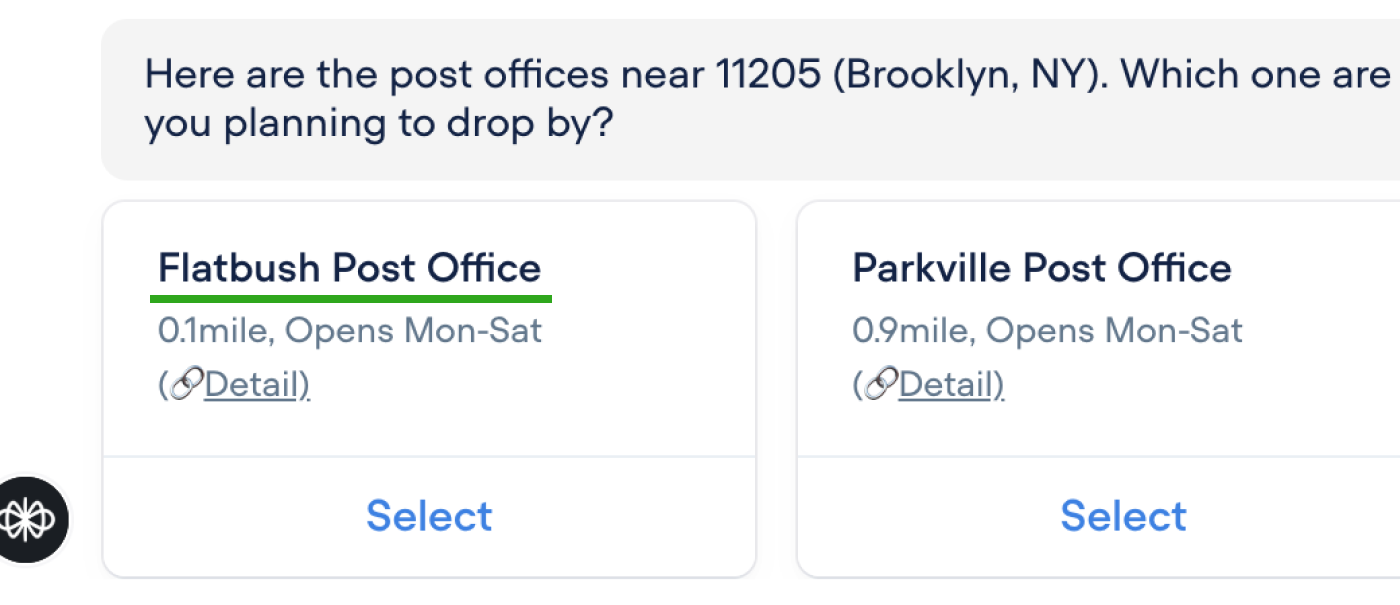
Before
The bot only asks for the origin ZIP code and does not provide further information about nearby post offices.
After
The bot suggests nearby post offices and their operating hours.
Insight 3
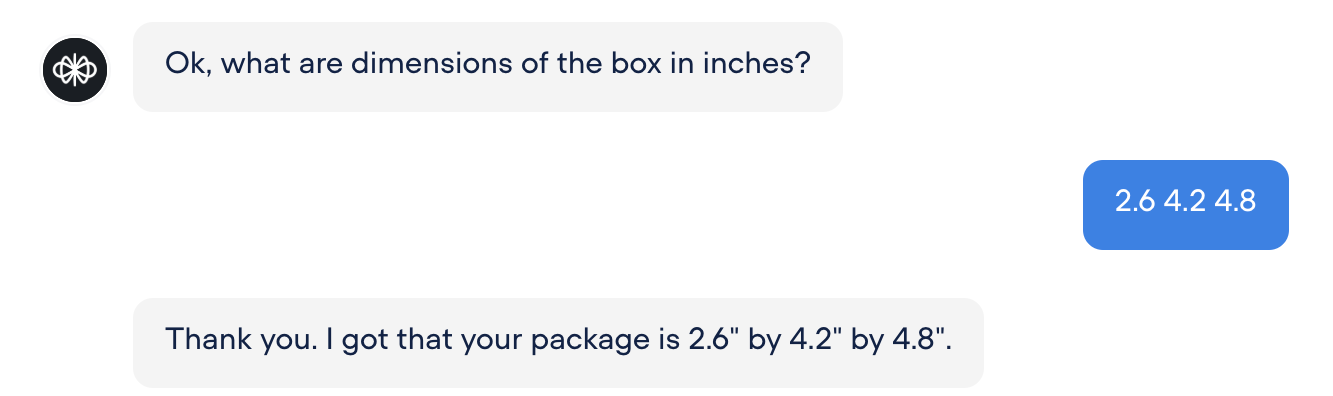
Users prefer inputting package dimensions at once.

The bot, by default, asked for width, height, and length one by one, but all testers preferred entering all dimensions at once.

Before
By default, the bot asked for width, height, and length one by one.
After
I updated the default settings to request all dimensions in a single input.
Final Design
Manage Expectation
I aimed to clearly communicate the bot's capabilities at the beginning.
Ask about Preference
Due to limited time, I only prepared button options. In the future, I want to make it more flexible to accommodate diverse user intents.
Explain Services
The overview of services helps users understand the context and importance of comparison. During testing, I observed that users proceeded to the price calculation without understanding the difference between flat rate and priority mail, so I added it.

To keep the conversation concise, I kept it brief and instead included a link for users to explore more details if they wish.
Check Dimension & Weight
The bot specifies units to prevent confusion about the required format. Users can provide all dimensions at once.

If they provide only one dimension, the bot adapts by prompting for the remaining dimensions—length and height—separately.

If users explicitly indicate that they are only interested in the flat rate service (fixed price), the bot skips the dimension request and asks whether the package weighs less than 70 pounds (maximum allowed weight).
Check Destination & Origin
To implicitly confirm whether users have entered the correct destination ZIP code, the bot returns the corresponding city and state, for example, '98109 (Seattle, WA).

If the ZIP code is incorrect or users indicate they forgot it, the bot prompts them to provide their address instead.

Then, the bot asks users if they are sending from their current location. If yes, it fetches their current location. Otherwise, it prompts them to enter the origin ZIP code.
Check Drop Date & Time
The bot asks for the drop-off date and time, as this information is also required by the website version.

Ideally, I wanted to implement a calendar input field. However, due to Voiceflow's feature limitations, I used a standard chat input.
Check Package Item
This question confirms that the package does not contain any exceptional items.
Confirm
I tried to make this concise. If there is a mistake, the bot asks which item needs to be corrected and redirects the user to the corresponding question.
Give Price Estimate and Recommend
In this conversation, the cheapest option is shared, as that’s users' preferences. Users can also view the full details through the provided link.
Ask about Options
(Insurance)
During testing, some participants expressed interest in learning about additional options such as insurance. That's why the bot includes this.
End Chat

Takeaway

Understand the strengths of conversational UI and intentionally choose the most appropriate solution

Leverage both conversational UIs and GUIs
User testing revealed that while some users prefer the website, others favor the chatbot. It is important to give users the freedom to choose their preferred interface, allowing them to take advantage of both.
Balancing simplicity and thoroughness is key
While users want the bot to provide more recommendations, such as mailing options, they also mention that they prefer short conversations. I learned the importance of finding a balance between the two.
Incorporate AI into conversation effectively
In this project, AI was only used as the backend for tasks like identifying city names from ZIP codes. In future projects, I want to incorportate AI response.
Conversational UI vs GUI

Through testing, I learned that some users prefer the chatbot to explore services and find the best option, while others prefer the GUI for quicker answers without fully understanding the service differences. It is important to give users the freedom to choose their preferred interface to address diverse needs.

Use of AI

In this project, AI was used only in the backend for tasks such as identifying city names from ZIP codes. It was not used to directly generate responses in order to avoid inconsistent results where precision is critical. However, I am interested in exploring AI generated conversations in the future.

DESIGN QUESTIONS

How might we communicate Ceneco Green Power’s commitment to cutting-edge solar technology, sustainability, and energy access transformation through engaging content and visuals?

How might we establish the website as a trusted source of information?